
Performance
How large a dataset ProtSpace can handle, and how fast it responds at each size.
ProtSpace draws every protein as a point, all of them, on every frame. How large a dataset stays smooth depends on your computer. These numbers come from a MacBook Air M4 with 24 GB of memory, in Chrome, with the window at 1600 x 1000. We have not measured other computers.
At a glance
| Proteins | Example | Ready after | Selecting a point | Switching the colouring | Panning and zooming |
|---|---|---|---|---|---|
| 573,649 | Swiss-Prot | 1.28 s | 56 ms | 131 ms | smooth (43.7 redraws/s) |
| 1 million | 1.81 s | 72 ms | 148 ms | smooth (43.7 redraws/s) | |
| 2.5 million | 3.43 s | 88 ms | 231 ms | smooth (38.0 redraws/s) | |
| 5 million | 6.77 s | 120 ms | 364 ms | slower (18.6 redraws/s) | |
| 10 million | STRING subset | 6.77 s | 192 ms | 582 ms | choppy (9.4 redraws/s) |
| 21 million | all eukaryotes in STRING | 14.79 s | 360 ms | 1181 ms | choppy (4.4 redraws/s) |
"Ready after" runs from choosing the file until loading has finished and the page is idle (all points are drawn earlier, at the first frame). More annotation columns mean a slower load: 10 million proteins with Swiss-Prot's 23 columns needed 14.46 s, against 6.77 s for STRING's 7.
Response time by dataset size
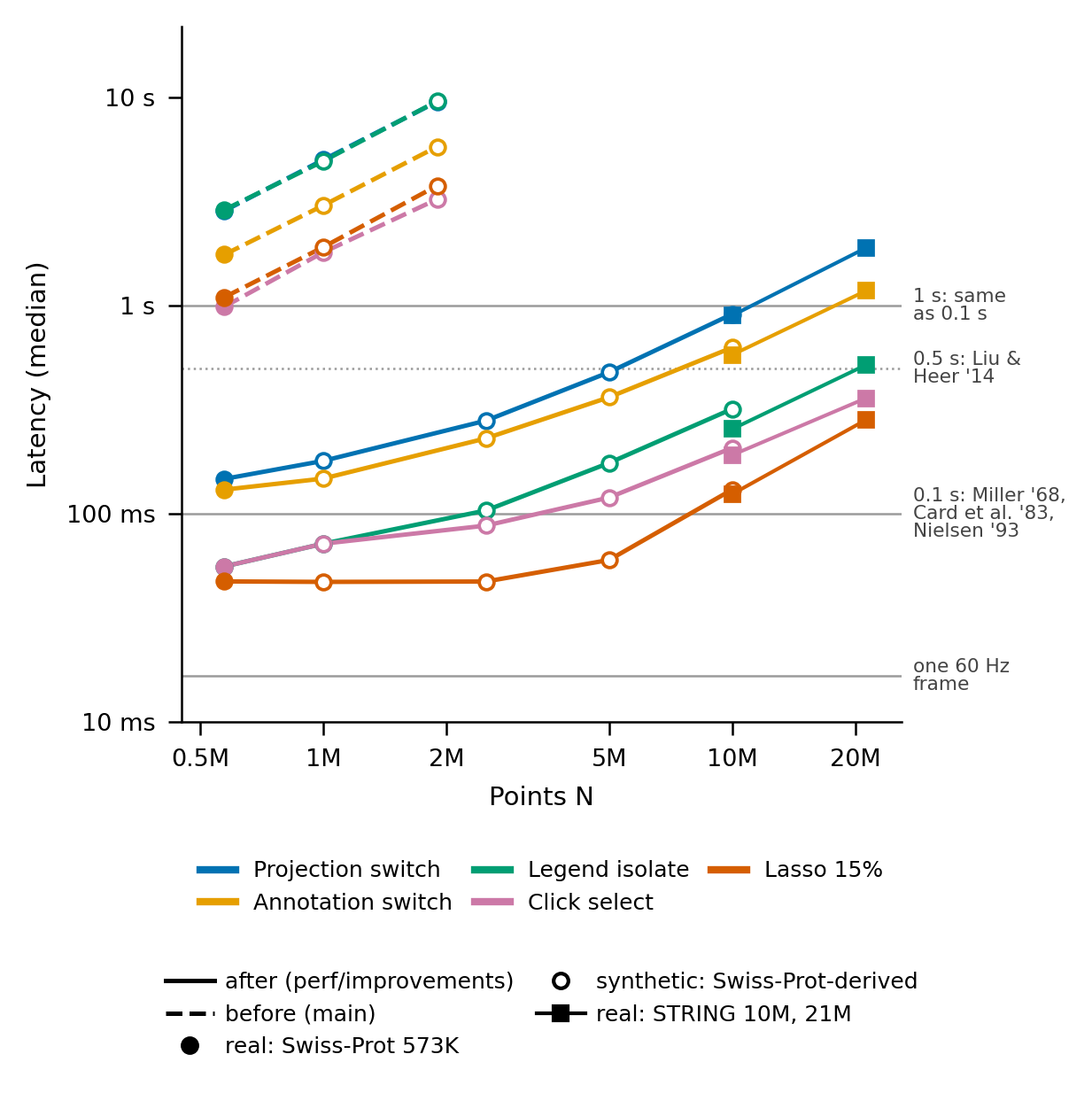
Solid lines are the current version and dashed lines the version before the speed-ups. Filled markers are real datasets (Swiss-Prot and STRING); open markers are synthetic bundles made by resampling Swiss-Prot.
What to expect
- Up to 1 million proteins: everything responds at once. Clicks, search, the legend and the lasso answer in under 100 ms, and switching the colouring or the projection takes under 0.2 s.
- 2.5 million: still comfortable. Isolating a legend value takes 104 ms.
- 5 million: a click takes 120 ms and isolating a legend value 176 ms. Panning and zooming become visibly slower.
- 10 million: everything works, with short pauses. Panning and zooming are choppy. Switching the colouring or the projection takes under a second.
- 21 million: it works, but it lags. Switching the colouring takes 1.2 s and the projection 1.9 s.
- 67 million: the largest size ProtSpace will load. A single test with a lean file (few annotations) took 66.6 s to open and used 12.1 GiB of memory plus 5.2 GiB for graphics, so it is not usable for exploring.
The projection times above are for the instant switch. By default, switching projections plays a 0.8 s animation, which runs slower on large datasets (5.4 s at 21 million). If your system is set to reduce motion, the switch is instant.
Limits
- 67,108,864 points. The most ProtSpace can draw. A larger dataset is refused with a message.
- 2 GiB per file. Larger files are refused. With Swiss-Prot's 23 annotation columns that is about 27 million proteins; the full 21M STRING file, with 7 columns, is 453 MiB.
- Old files over 2 million rows. Bundles in the old v1 or v2 format are limited to 2,000,000 rows. Convert them with
protspace convert, and the limits above apply.
Memory
Plan for about 4.4 GiB of memory per 10 million proteins (474 bytes each), plus 1.17 GiB for the browser itself. That is for 23 annotation columns; fewer columns need less. Opening a file needs more for a moment: the peak was 5.88 GiB for 10 million Swiss-Prot-like proteins and 7.97 GiB for the 21M STRING dataset. If memory runs out, the browser may close the tab.
Measure it on your computer
From a checkout of the repository, with $DATA any folder outside it. The first command downloads the Swiss-Prot bundle into perf/datasets/, and the second resamples it to 5 million proteins:
pnpm perf:fetch --only 573K_swissprot

uv run perf/scale/generate.py swissprot \
  --source perf/datasets/573K_swissprot.parquetbundle \
  --n 5000000 --out "$DATA/swissprot-5M.parquetbundle"

pnpm perf:scale --datasets 5M="$DATA/swissprot-5M.parquetbundle"
The results go to perf/results/scale-<time>/. Run it on power, with other apps closed.